PharmaGovFlow
The PharmaGovFlow example demonstrates how Permguard enforces governance — policy-based authorization — across the distinct trust boundaries of a pharmacy ecosystem.
It shows how roles and workloads interact within a Zero Trust governance model, focusing on who can do what on which resources.
The ecosystem is modeled across three domains, each with its own trust boundary, zone, and ledger:
- Platform-Administration Domain — manages the pharmacy franchise: branches, teams, and role assignments.
- Operations-Management Domain — handles operational workflows: medication orders, fulfillment, stock levels, and logistics.
- Patient-Services Domain — covers clinical workflows: patients, prescriptions, medication requests, and dispensing.
Before proceeding, ensure the CLI is installed and the Server is running.
Creating the Zones and Ledgers
The first step is to segment the trust boundaries using Permguard zones, and create a dedicated ledger for each one.
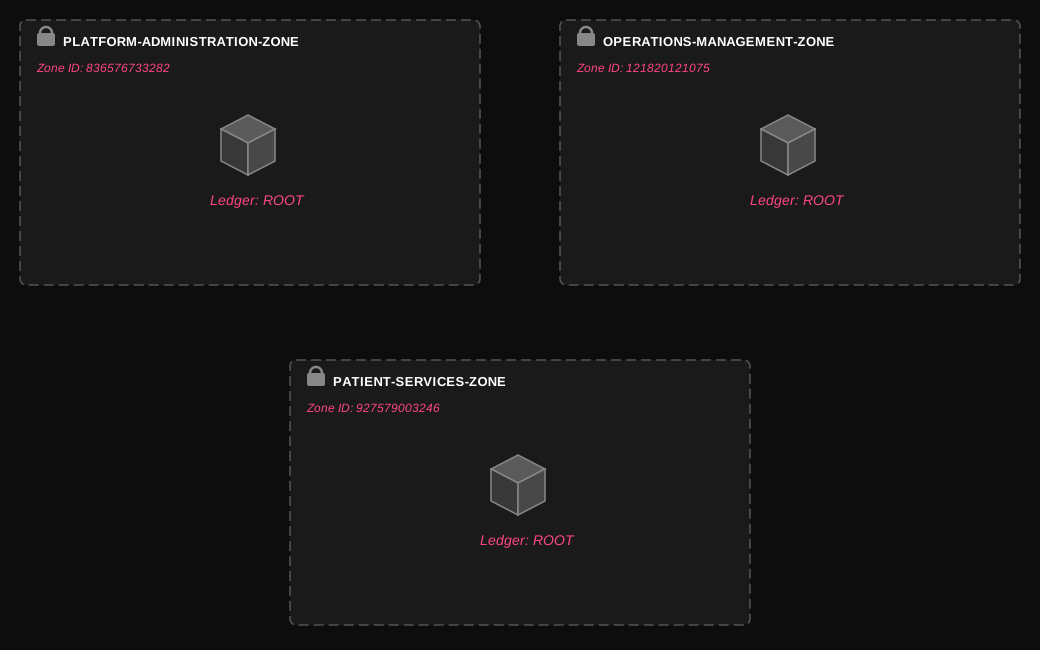
Permguard conventionally names the main ledger of a zone root, representing the primary policy store of that zone.
permguard zones create platform-administration-zone
permguard authz ledgers create root --zone-id 836576733282
permguard zones create operations-management-zone
permguard authz ledgers create root --zone-id 121820121075
permguard zones create patient-services-zone
permguard authz ledgers create root --zone-id 927579003246
Captured output.
❯ permguard zones create platform-administration-zone
836576733282: platform-administration-zone
❯ permguard authz ledgers create root --zone-id 836576733282
9c08015ca0fe46e9b0b54179cbd22bf3: root
❯ permguard zones create operations-management-zone
121820121075: operations-management-zone
❯ permguard authz ledgers create root --zone-id 121820121075
a0d10339102c4690a8c13a01ac60cd74: root
❯ permguard zones create patient-services-zone
927579003246: patient-services-zone
❯ permguard authz ledgers create root --zone-id 927579003246
b811788cde40438d90f062b9d5a7fd2c: root
Architecture Overview
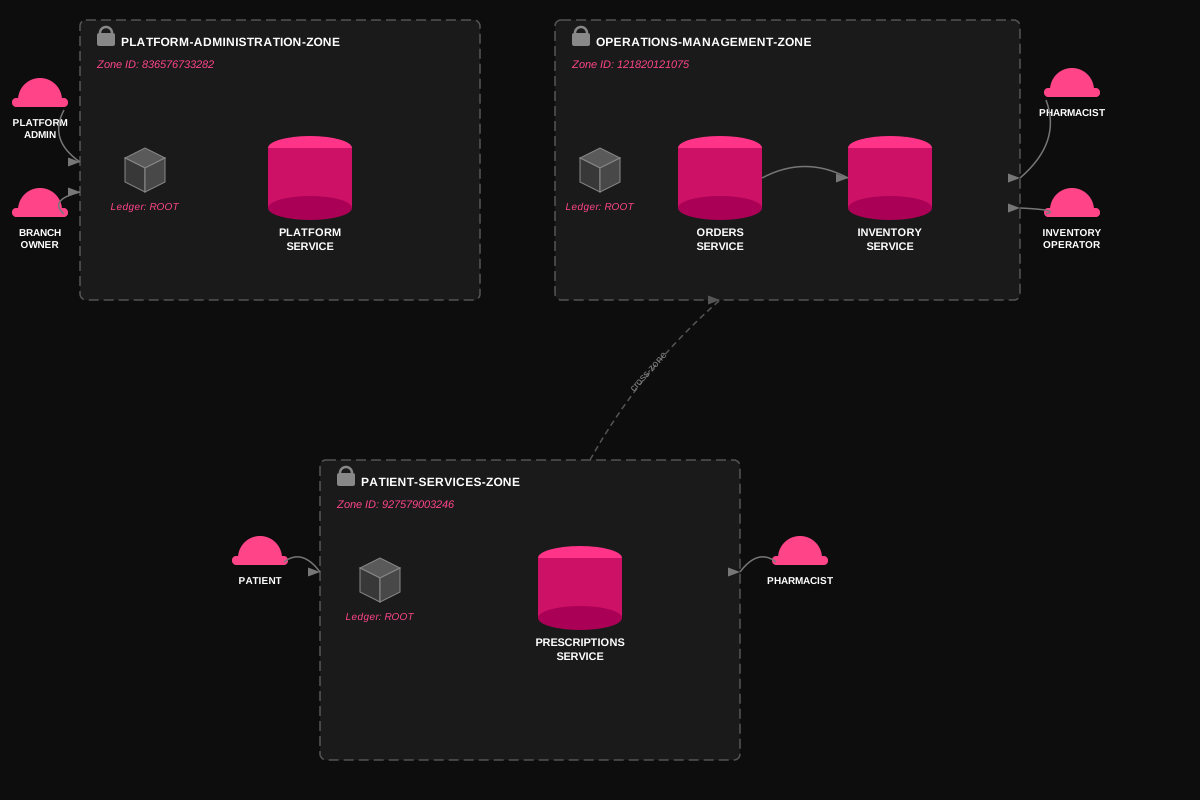
The diagram below shows the roles, services, and cross-zone interactions for the two main use cases:
- Branch Management — administrative workflow for creating branches and assigning teams.
- Prescription & Medication Order Flow — clinical workflow from prescription submission to stock verification.
Platform Administration Zone
This section walks through the full example for the platform-administration-zone: workspace setup, policy definition, apply, and authorization check.
The other two zones follow the same steps and are described in the Out of Scope section below.
A workspace represents a local working space. Please refer to the Learning Workspace section for more information about the workspace.
This example uses roles as the identity attribute (e.g. role/platform-admin, role/branch-owner) for simplicity.
Permguard is not limited to role-based access control: it natively supports ABAC (attribute-based access control), where policies evaluate any attribute of the principal, resource, or context — such as department, clearance level, branch ID, or request origin.
Roles are a special case of attributes, not a constraint of the model.
Roles
| Role | Description |
|---|---|
platform-admin | Full control over franchise-level branches |
branch-owner | Manages team and role assignments within their branch |
Workspace Setup
mkdir -p ./platform-administration-zone && cd ./platform-administration-zone
permguard init --language cedar
permguard remote add origin localhost
permguard checkout origin/836576733282/root
Captured output.
❯ mkdir -p ./platform-administration-zone && cd ./platform-administration-zone
❯ permguard init --language cedar
Initialized empty permguard ledger in '.'.
❯ permguard remote add origin localhost
Remote origin has been added.
❯ permguard checkout origin/836576733282/root
Ledger root has been added.
The local workspace is already fully up to date with the remote ledger.
Policies
The following six policies govern access to Branch resources within the platform administration domain.
The Cedar namespace PharmaGovFlow::Platform identifies the resource and action types belonging to this zone.
The platform-admin role has full lifecycle control over branches. The branch-owner role can assign and revoke team roles, but only on branches with status == "active" — a when condition that combines role-based and attribute-based rules in a single policy.
cat << EOD > platform-policies.cedar
@id("branch-read-all")
permit(
  principal == Permguard::Identity::Attribute::"role/platform-admin",
  action == PharmaGovFlow::Platform::Action::"view",
  resource is PharmaGovFlow::Platform::Branch
);

@id("branch-create")
permit(
  principal == Permguard::Identity::Attribute::"role/platform-admin",
  action == PharmaGovFlow::Platform::Action::"create",
  resource is PharmaGovFlow::Platform::Branch
);

@id("branch-update")
permit(
  principal == Permguard::Identity::Attribute::"role/platform-admin",
  action == PharmaGovFlow::Platform::Action::"update",
  resource is PharmaGovFlow::Platform::Branch
);

@id("branch-deactivate")
permit(
  principal == Permguard::Identity::Attribute::"role/platform-admin",
  action == PharmaGovFlow::Platform::Action::"deactivate",
  resource is PharmaGovFlow::Platform::Branch
);

@id("branch-assign-role")
permit(
  principal == Permguard::Identity::Attribute::"role/branch-owner",
  action == PharmaGovFlow::Platform::Action::"assign-role",
  resource is PharmaGovFlow::Platform::Branch
)
when {
  resource.status == "active"
};

@id("branch-revoke-role")
permit(
  principal == Permguard::Identity::Attribute::"role/branch-owner",
  action == PharmaGovFlow::Platform::Action::"revoke-role",
  resource is PharmaGovFlow::Platform::Branch
)
when {
  resource.status == "active"
};
EOD
Apply Changes
permguard apply
Captured output.
❯ permguard apply
Initiating the planning process for ledger head/836576733282/9c08015ca0fe46e9b0b54179cbd22bf3.
Planning process completed successfully.
The following changes have been identified and are ready to be applied:

        + / bafyreihpffvdnop3wimguocylm76ryn5kyzxwzfykq73lkvmxl47imnssu branch-read-all
        + / bafyreicbpzgtgil3pit5yf24jfbkzbgjzdpxpn4aztuzcfg4fc4mi3zasi branch-create
        + / bafyreiap3nqh7kzlmvc2wvhxqjhd7ry5p2xobtef4nkr6z3fxvpwb4syui branch-update
        + / bafyreib4lmtxkjqrp5uv6oygz2d3cwfnh8ea7kqvswlitd5fxmp9e3n2ja branch-deactivate
        + / bafyreid8qnwjhxcvmlpk3a5o2gft6rey4znsuw7bdqivmc9e3tpl7kxf4a branch-assign-role
        + / bafyreif2zsxhvnkg4qpj7lbwt3md5coru8eay6nvkqdi9xfjp1we5zvqm4 branch-revoke-role

unchanged 0, created 6, modified 0, deleted 0

Initiating the apply process for ledger head/836576733282/9c08015ca0fe46e9b0b54179cbd22bf3.
Apply process completed successfully.
Your workspace is synchronized with the remote ledger: head/836576733282/9c08015ca0fe46e9b0b54179cbd22bf3.
Authorization Check
Please refer to the Command Line section for more information about the available commands.
In this scenario, the platform-service is running an async job that acts on behalf of a branch-owner: it needs to assign a role on a branch.
The workload is identified by its own SPIFFE certificate (principal), while the role it is exercising is carried as the subject.
This separation is key: the cryptographic identity of the executor and the business role it acts under are two distinct concepts in Permguard.
cat << EOD > request.json
{
  "authorization_model": {
    "zone_id": 836576733282,
    "policy_store": {
      "kind": "ledger",
      "id": "9c08015ca0fe46e9b0b54179cbd22bf3"
    },
    "principal": {
      "type": "workload",
      "id": "spiffe://edge.example.com/workload/platform-service",
      "source": "spire"
    }
  },
  "request_id": "1f12378d138e4c75b70d7cfa32345d39",
  "subject": {
    "type": "attribute",
    "id": "role/branch-owner"
  },
  "resource": {
    "type": "PharmaGovFlow::Platform::Branch",
    "id": "fb008a600df04b21841c4fb5ad27ddf7",
    "properties": {
      "status": "active"
    }
  },
  "action": {
    "name": "PharmaGovFlow::Platform::Action::assign-role"
  }
}
EOD
permguard authz check ./request.json -o json
Here's what gets returned.
❯ permguard authz check ./request.json -o json  | jq
{
  "authorization_check": {
    "request_id": "1f12378d138e4c75b70d7cfa32345d39",
    "decision": true,
    "context": {
      "id": "c93bee3ea953415394523737043c065d"
    },
    "evaluations": [
      {
        "request_id": "1f12378d138e4c75b70d7cfa32345d39",
        "decision": true,
        "context": {
          "id": "c93bee3ea953415394523737043c065d"
        }
      }
    ]
  }
}
Out of Scope Zones
The operations-management-zone and patient-services-zone follow the same workflow: workspace init, checkout, policy file, apply, and check.
They are not walked through here to keep the example focused. The policy design for each zone is summarized below as a reference.
Operations Management Zone
Namespace: PharmaGovFlow::Operations · Zone ID: 121820121075
Roles:
| Role | Description |
|---|---|
pharmacist | Creates and approves medication orders |
inventory-operator | Manages stock levels and opens replenishment orders |
Resources:
| Resource | Attributes |
|---|---|
MedicationOrder | status: pending | approved | fulfilled |
InventoryItem | quantity_available, reorder_threshold |
Policies:
| Policy ID | Principal | Action | Resource | Condition |
|---|---|---|---|---|
medication-order-read | pharmacist | view | MedicationOrder | — |
medication-order-create | pharmacist | create | MedicationOrder | status != "fulfilled" |
medication-order-approve | pharmacist | approve | MedicationOrder | status == "pending" |
inventory-read-update | inventory-operator | view, update | InventoryItem | — |
inventory-replenishment-order | inventory-operator | create-replenishment | InventoryItem | quantity_available <= reorder_threshold |
service-order-creation | workload prescriptions-service | create | MedicationOrder | cross-zone from patient-services |
Patient Services Zone
Namespace: PharmaGovFlow::PatientServices · Zone ID: 927579003246
Roles:
| Role | Description |
|---|---|
patient | Submits and tracks their own prescriptions |
pharmacist | Validates or rejects pending prescriptions |
Resources:
| Resource | Attributes |
|---|---|
Prescription | status: draft | pending | validated | rejected |
Policies:
| Policy ID | Principal | Action | Resource | Condition |
|---|---|---|---|---|
prescription-create | patient | create | Prescription | — |
prescription-read-own | patient | view | Prescription | — |
prescription-edit-draft | patient | update | Prescription | status == "draft" |
prescription-read-all | pharmacist | view | Prescription | — |
prescription-validate | pharmacist | validate | Prescription | status == "pending" |
prescription-reject | pharmacist | reject | Prescription | status == "pending" |
Next Steps
This example demonstrates how to configure a zone, define Cedar policies with role-based and attribute-based conditions, and verify authorization decisions with permguard authz check.
To better understand the policy store internals, explore the Ledger's Git-like object storage.
Please refer to the Command Line Objects section for more information about the available commands.
It is recommended to explore the Policy as Code section to learn more about the policy store and the policy language.
Please refer to the Deployment Options section for more information about configuration and deployment.